Search Burleson County Property Records, Review 2026 Values and Pay the Correct Tax Account
Use this guide to find a Burleson CAD property, understand land and improvement values, verify exemptions, open the interactive map, prepare protest evidence and reach the correct Tax Office account.
Burleson County Appraisal District determines property values and administers exemptions, agricultural appraisal, renditions and appraisal protests. The Burleson County Tax Assessor-Collector issues tax statements, accepts payments and handles current or delinquent balances.
Quick Answer: Which Burleson County Office Handles Your Task?
Use Burleson CAD for
Property search, market value, land and building details, mailing-address updates, exemptions, agricultural appraisal, wildlife management, business renditions, maps and appraisal protests.
Use the Tax Office for
Tax statements, current balances, online payments, partial payments, receipts, penalty, interest, attorney fees and delinquent-tax questions.
Use the County Clerk for
Recorded deeds, liens, releases, easements, subdivision records, oil-and-gas instruments, probate documents and certified copies.
Correct routing saves time: Protest the appraisal value or exemption decision through Burleson CAD. Resolve the billed balance, payment or receipt through the Tax Assessor-Collector.
Start Here: Choose the Property Result You Need Today
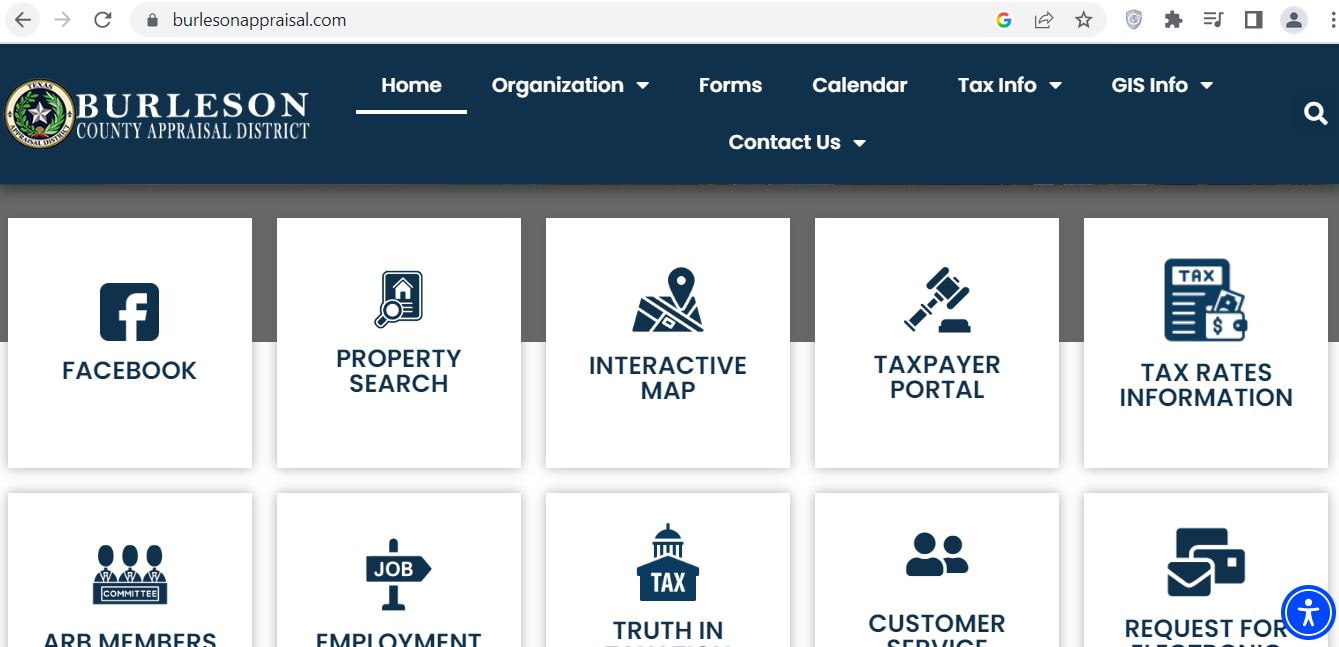
The supplied screenshot shows the Burleson County Appraisal District homepage. The page uses large service tiles, making it easier to move directly to property search, mapping, the taxpayer portal, tax-rate information and public-information resources.
Official Burleson CAD homepage with the main property-search, map, taxpayer-portal and tax-information shortcuts.
1Verify the domain
Confirm that the browser shows burlesonappraisal.com. Do not confuse Burleson County with the City of Burleson in Johnson and Tarrant counties.
2Select Property Search
Use the house-and-magnifying-glass tile to search by Owner, Address, ID or Advanced criteria.
3Select Interactive Map
Use the map-pin tile after identifying the correct account. Match the property ID, legal description and acreage.
4Select Taxpayer Portal
Use the gavel tile for available taxpayer-account, protest or communication services. Create an account only on the official portal domain.
5Select Tax Rates Information
Use the tax-document tile to reach local rate and truth-in-taxation information during the annual budget and rate-setting season.
6Use the top navigation
Forms contains applications, Calendar explains deadlines, Tax Info covers appraisal topics, GIS Info covers data and Contact Us shows office details.
Best route from the screenshot: Select Property Search, copy the property ID, then return to the map, forms, taxpayer portal or Tax Office using that exact identifier.
How to Search Burleson County CAD Property Records
Choose Owner, Address, ID or Advanced.
Use ID when you have the property number from an appraisal notice or prior tax document.
Start with a shorter owner name.
Search only the first or last name. For a company, trust or estate, begin with one distinctive word.
Simplify the address.
Use the main street name or street number plus street name. Remove Road, Street, Lane, Highway and directional abbreviations when necessary.
Use Advanced Search for broad results.
Add property type, subdivision, abstract, acreage, city, legal-description or value criteria one field at a time.
Select the correct account type.
Separate real estate, business personal property, mineral interests and manufactured-home accounts.
Confirm tax year 2026.
Review earlier years only when comparing value, ownership or exemption history.
Open every plausible result.
One owner may have a residence, lake lot, farm acreage, mineral interest, manufactured home or business account.
Save a dated property report.
Print or save the account before filing a form, requesting a correction, protesting or paying taxes.
Local search tip: For property near Caldwell, Somerville, Snook, Deanville, Lyons, Chriesman or Lake Somerville, owner, property-ID, subdivision, abstract or legal-description searches may work better than a complete rural address.
Five Checks Before Using a Burleson CAD Result
Property ID
Match the notice or prior tax record.
Owner name
Check current and prior ownership.
Legal description
Verify abstract, survey, lot, block or tract.
Address or acreage
Confirm the physical property involved.
Property type
Check real, mineral, personal or mobile home.
Multiple-account warning: Land, a residence, minerals, a manufactured home and business equipment can be listed separately. Do not assume one search result represents the entire property.
Burleson CAD Search Problems and Practical Fixes
Problem
Try This
What to Verify
Full owner name returns nothing
Search only the first or last name.
The record may use initials, a shortened name or a different owner order.
Recent buyer is missing
Search the seller or previous owner.
Compare the CAD account with the newest recorded deed.
Full address gives no result
Use only the main street name.
The appraisal situs may differ from the mailing or 911 address.
Too many results appear
Use Advanced Search and add city, property type, abstract, subdivision or acreage.
Do not select an account solely because the owner matches.
Lake-area lot is unclear
Search by subdivision, lot, property ID or adjoining owner.
Adjoining lots can have separate accounts and separate tax balances.
Manufactured home is missing
Search the landowner and home owner separately.
The home may be appraised separately from the land.
Mineral account is missing
Search the mineral owner, lease or operator information.
Surface and mineral ownership may differ.
No account can be identified
Call BCAD with the prior owner, approximate location and deed description.
Ask staff for the correct property ID and account type.
“I am trying to identify the correct Burleson CAD account. The current or prior owner is ______, the property is near ______, and the deed or notice shows ______. Can you confirm the property ID, legal description and property type?”
How to Read a Burleson CAD Property Record
Record Field
Plain-English Meaning
What to Check
Property ID
The appraisal district’s primary property-account identifier.
Use the exact number on forms, calls, protests and tax searches.
Owner name
The owner currently displayed for appraisal purposes.
Use the recorded deed when legal ownership must be proved.
Mailing address
Where appraisal notices and tax statements may be mailed.
Correct an outdated address before a deadline or bill is missed.
Situs address
The physical location used by the district.
Rural situs wording may differ from postal formatting.
Legal description
Abstract, survey, subdivision, lot, block or tract information.
Compare it with the deed, plat or survey.
Land market value
The district’s estimated market value for the land.
Acreage, location, access, land class and homesite allocation.
Improvement value
Value assigned to homes, barns, shops and other structures.
Size, age, quality, condition, use and removed improvements.
Market value
The January 1 estimate of the property’s market value.
Compare with sales, condition and similar properties.
Appraised value
Value after an applicable statutory limitation.
A homestead cap does not freeze the market value.
Agricultural value
Productivity value for qualifying open-space land.
Qualifying acreage, intensity, use history and homesite separation.
Exemptions
Approved homestead, age, disability, veteran or other relief.
Verify the correct benefit, owner and tax year.
Value history
Prior-year appraisal amounts.
Identify whether land, buildings or classification caused the 2026 change.
Legal-record warning: Online acreage, ownership and parcel lines are research tools. Verify legal ownership and boundaries through recorded documents, title research and a professional survey.
Burleson County 2026 Appraisal Audit Checklist
Compare 2025 and 2026 market values.
Separate land and improvement changes.
Confirm acreage and legal description.
Check living area and building measurements.
Review year built, quality and condition.
Look for newly added structures.
Confirm removed or damaged buildings are corrected.
Check homestead and other exemptions.
Review agricultural productivity value.
Verify homesite acreage separately.
Compare similar local properties.
Save photographs and repair estimates.
Caldwell residence
Compare similar homes by neighborhood, living area, age, condition, construction quality and lot size.
Somerville or lake-area property
Check subdivision, lot identity, water influence, improvements, access and separate adjoining accounts.
Rural farm or ranch
Review every tract, homesite acreage, agricultural use, fencing, water, road access, leases and improvements.
“Property ID ______ changed from ______ in 2025 to ______ in 2026. Please explain which land, improvement, exemption, classification or property-detail change caused the difference.”
How to Use the Burleson CAD Interactive Map
Find the property account first.
Copy the property ID, owner, legal description and acreage.
Create or sign in to your account.
Use an email address you monitor during appraisal and protest season.
Add the correct property.
Follow the portal instructions and use any owner PIN, notice information or verification details requested.
Confirm the linked account.
Match the property ID, owner and legal description before submitting anything.
Save portal confirmations.
Download or screenshot electronic submissions, messages and filing dates.
Portal security: Do not enter an owner PIN, identity document or banking information into a third-party site that only resembles the official BCAD portal.
Burleson County Homestead and Property-Tax Exemptions
Exemption or Relief
2026 Starting Point
What to Prepare
General residence homestead
School districts provide a mandatory $140,000 exemption.
Ownership, principal-residence information and required identification.
Age 65 or older
Qualifying owners receive an additional mandatory $60,000 school exemption.
Age, ownership and residence information.
Disabled person
Qualifying disabled owners may receive additional relief and related protections.
Disability documentation accepted under Texas requirements.
Disabled veteran or survivor
The benefit can be partial or total depending on the statutory category.
VA rating, service records and applicable survivor documents.
Heir-property homestead
An occupying heir may qualify without being individually named on a recorded deed.
Ownership affidavit, death certificate, utility record and available court documents.
Tax deferral
Some age-65 or disabled homeowners may defer collection on a qualifying homestead.
Understand that the lien remains and interest may continue.
How to File a Burleson CAD Homestead Application
Search and verify the property.
Confirm the property ID, owner, situs address and legal description.
Select the correct exemption.
Review residence-homestead, veteran and any supporting affidavit required for the ownership situation.
Complete every ownership section.
Include spouse, co-owner, trust, heir-property or manufactured-home details when applicable.
Attach the required evidence.
Follow the current form’s identification, ownership and residence instructions.
Mail or deliver the packet.
Send completed forms to Burleson County Appraisal District, P.O. Box 1000, Caldwell, TX 77836, or confirm another accepted method.
Keep filing proof.
Save the complete packet and delivery confirmation.
Verify the exemption online.
Confirm the benefit appears for the correct owner, property and tax year.
New-owner reminder: A seller’s exemption, appraisal cap, age-65 ceiling or veteran benefit does not automatically transfer to a buyer.
Agricultural and Wildlife Appraisal in Burleson County
Rural acreage, livestock or an agricultural mailing address does not automatically qualify land for 1-d-1 open-space appraisal. BCAD evaluates principal use, degree of intensity and qualifying-use history.
Review Area
What Must Be Shown
Useful Evidence
Principal agricultural use
Agriculture is the land’s primary qualifying use.
Livestock, grazing, hay, crops, production and sales records.
Degree of intensity
The operation meets locally typical intensity.
Stocking, water, feed, fencing, equipment and management records.
Historical use
The property satisfies the required qualifying-use history.
Prior applications, leases, receipts, photographs and operator statements.
Leased operation
A tenant actively conducts the qualifying agricultural activity.
Signed lease, operator contact and production records.
Wildlife management
The land satisfies prerequisite appraisal and wildlife-practice requirements.
Wildlife plan, maps, practice logs, receipts and dated photographs.
Homesite separation
Residential acreage is separated from qualifying productive land.
Survey, aerial image and acreage breakdown.
Current agricultural application
Property ID for every tract
Legal description and acreage
Map of the claimed land
Description of current use
Qualifying-use history
Livestock, crop or hay records
Lease when another person operates the land
Receipts and dated photographs
Wildlife plan when applicable
Normal filing date: A 1-d-1 application is generally due by April 30. Contact BCAD immediately when the regular deadline has passed because late-filing rules and penalties can apply.
Change-of-use warning: Converting qualified land to a nonagricultural use can create rollback-tax consequences. Request current guidance before subdividing or developing the land.
Business Personal Property, Minerals and Manufactured Homes
Business personal property
Machinery, equipment, furniture, computers, tools, vehicles, inventory and supplies may require an annual rendition.
Mineral and industrial accounts
BCAD’s annual-report information indicates that industrial, utility and mineral properties are valued through specialized appraisal services.
Manufactured homes
The home and underlying land may have different owners, property IDs and tax accounts.
Business Rendition Checklist
Business legal and trade names
BCAD property or owner ID
Physical business location
Asset descriptions
Original acquisition costs
Acquisition years
Disposed or retired assets
Leased equipment
Inventory and supplies
Authorized signature
Normal rendition timing: Business-personal-property renditions are generally due April 15. A timely written request normally extends the deadline to May 15.
2026 exemption: Qualifying income-producing tangible personal property receives a $125,000 exemption in each taxing unit. Contact BCAD before assuming no rendition or application is needed.
How to Prepare a Burleson County CAD Protest
July 2026 timing: The regular protest period has generally passed for owners who received timely spring appraisal notices. The exact deadline printed on the Notice of Appraised Value controls.
Normal Texas rule
May 15 or 30 days after notice delivery, whichever is later.
Controlling date
Use the deadline printed on the individual appraisal notice.
Busy season
BCAD notes that May and June can produce longer response times.
Formal decision
The Appraisal Review Board decides unresolved protests.
Protest Issue
Evidence That Helps
Weak Argument to Avoid
Market value is too high
Comparable sales, appraisal, repair estimates, photographs and condition records.
Only saying the tax bill increased.
Unequal appraisal
Comparable appraisal accounts adjusted for location, size, age, quality and condition.
Using one unrelated low-value property.
Building details are wrong
Measurements, plans, photographs and records showing actual construction.
An unsupported verbal estimate.
Land or acreage is wrong
Deed, plat, survey, access, drainage, restrictions and land-use evidence.
Relying only on an approximate GIS line.
Exemption was denied or removed
Application, identification, ownership proof and qualification records.
Assuming the previous owner’s exemption transferred.
Agricultural appraisal was denied
Use history, leases, stocking, production, receipts, maps and photographs.
Saying only that the land is rural.
Burleson CAD Protest Micro-Steps
Read the Notice of Appraised Value.
Record the property ID, proposed value, reason for change and exact deadline.
Save the live property account.
Review land, improvements, exemptions, classifications and prior-year values.
Identify each disputed issue.
Separate market-value, unequal-appraisal, data-error, exemption and agricultural arguments.
State the result you believe is correct.
Connect the requested value or classification to specific evidence.
Use an official filing route.
Open BCAD Online Protest, use the taxpayer portal or file the current Notice of Protest form.
Keep proof of filing.
Save the portal confirmation, stamped copy or accepted mailing evidence.
Request appraisal evidence.
Ask for worksheets, comparable properties, photographs and other evidence the district plans to use.
Prepare a one-page hearing summary.
List the requested result, strongest reasons and labeled exhibit numbers.
“I am reviewing Burleson CAD property ID ______ for tax year 2026. My notice shows a deadline of ______. Please confirm the accepted filing method, evidence procedure and hearing status.”
What to Do After the Regular Protest Deadline
Required notice was not received
Explain when the notice was discovered and which mailing address BCAD used.
Clerical or ownership error
Ask whether the account qualifies for an appraisal-roll correction.
Substantial over-appraisal
A limited statutory correction may apply when specific legal and payment requirements are met.
Late exemption
Certain homestead, age-65, disability and veteran applications have special late-filing provisions.
Incorrect property details
Provide the deed, survey, measurements, photographs or duplicate-account evidence.
Taxes remain unpaid
Contact the Tax Office separately because an appraisal inquiry does not automatically stop penalties or collection.
Act promptly: Give BCAD the property ID, tax year, notice history, exact error and payment status. Late remedies are limited and fact-specific.
How to Search and Pay Burleson County Property Taxes
The Burleson County Tax Assessor-Collector receives the certified appraisal roll, applies the adopted tax rates, mails statements and collects current and delinquent taxes.
Drop box
The Tax Office lists a drop box at the Echols Street entrance.
Tax-statement schedule: The Tax Office says current statements are mailed during the first week of October. The normal payment deadline is January 31.
Delinquency warning: Unpaid taxes normally become delinquent February 1. The Tax Office states that penalty accrues monthly and a 15% attorney fee is added July 1 on applicable delinquent accounts.
“I need the complete payoff for Burleson County tax account ______ through ______. Please confirm every unpaid year, penalty, interest, collection fees and accepted payment methods.”
Which Taxing Units May Appear on the Bill?
The Tax Office lists collection responsibilities for the following local entities. The exact combination depends on the property’s location.
County-related
Burleson County, Burleson County Road and Burleson County Hospital.
School districts
Caldwell ISD, Somerville ISD and Snook ISD.
Cities
City of Caldwell, City of Somerville and City of Snook.
Special districts
Burleson County MUD and Beaver Creek Water Control and Improvement District.
Check each line
Verify that every taxing unit matches the property’s actual location.
Rate questions
Contact the taxing unit about its adopted rate; contact BCAD about the taxable value.
Burleson CAD vs Tax Office vs County Clerk
Your Task
Correct Starting Office
Reason
Search owner or appraisal value
Burleson CAD
BCAD maintains appraisal accounts and values.
Correct land or building data
Burleson CAD
BCAD maintains property characteristics.
Apply for an exemption or agricultural appraisal
Burleson CAD
The chief appraiser reviews qualification.
Protest an appraisal
BCAD / Appraisal Review Board
The ARB decides unresolved appraisal protests.
Pay taxes or obtain a receipt
Tax Assessor-Collector
The Tax Office bills and collects property taxes.
Find a deed, lien or easement
Burleson County Clerk
The Clerk records official property instruments.
Confirm a legal boundary
Licensed surveyor
CAD parcel lines are not legal surveys.
Complete a title examination
Title company or attorney
One appraisal or deed record does not reveal every title issue.
How to Search Burleson County Deeds and Official Records
The County Clerk provides an official online property-record system containing records from 1940 to the present. The live portal supports grantor, grantee, subdivision, document-type and document-number searches.
Save the BCAD property information.
Copy the owner, property ID, subdivision, abstract, lot, block and legal description.
Property alert
Free property-record notification registration is available.
Fraud-monitoring step: Register for the Property Alert service and add the owner-name variations most likely to appear on a filing.
Title warning: Finding one deed does not prove that no mortgage, tax lien, easement, mineral reservation, probate issue or later instrument affects the property.
Burleson County Buyer and New-Owner Checklist
Appraisal record
Property ID
Owner and mailing address
Legal description
Acreage and land class
Building details
Every related account
Taxes and exemptions
Current tax balance
Prior-year balances
Penalty and interest
Homestead status
Agricultural appraisal
Payment or deferral status
Title and land research
Latest recorded deed
Liens and releases
Mineral reservations
Easements and restrictions
Survey and legal access
Flood, septic and permit research
Purchase-year warning: Do not estimate the future bill only from the seller’s current taxes. The seller may have a homestead cap, tax ceiling, veteran exemption or agricultural appraisal that will not automatically transfer.
Practical Burleson County Property Scenarios
Caldwell residence
Check building data, homestead status, city tax, Caldwell ISD and new improvements.
Somerville property
Verify city limits, Somerville ISD, lake-area influence, subdivision and adjoining accounts.
Snook-area property
Confirm City of Snook, Snook ISD, rural acreage and every tract attached to the owner.
Lake Somerville lot
Review subdivision, access, flood information, water influence, restrictions and separate lots.
Farm or ranch acreage
Match every tract, homesite acreage, agricultural activity, lease, fencing, water and road access.
Inherited family land
Compare the CAD owner with probate and deed records. Updating a mailing address does not transfer legal title.
Burleson County Property Office Contacts
Values, exemptions and protestsBurleson County Appraisal District
111 E. Fawn Street
Caldwell, TX 77836
Before visiting: Call the responsible office to confirm holiday closures, current lobby hours, accepted filing methods, required identification and payment types.
Burleson County Appraisal District Office Map
Use this map for directions to BCAD at 111 E. Fawn Street in Caldwell.
Use live official records
Return to the responsible official portal whenever you need a current owner, value, tax balance, deadline, map or filing status.
Burleson County CAD Property Search FAQs
1. What is the official Burleson County CAD website?
The official Burleson County Appraisal District website is BurlesonAppraisal.com. Its direct property-search portal is eSearch.BurlesonAppraisal.com.
2. Where is Burleson County Appraisal District located?
BCAD is located at 111 E. Fawn Street, Caldwell, Texas 77836. Its mailing address is P.O. Box 1000, Caldwell, Texas 77836.
3. What is the Burleson CAD phone number?
The main Burleson County Appraisal District telephone number is 979-567-2318.
4. Who is the Burleson CAD Chief Appraiser?
The official district staff information lists Tonya Barnes, RPA, as Chief Appraiser.
5. How do I search Burleson County property records?
Open the official search and choose Owner, Address, ID or Advanced. Start with fewer words, then verify the property ID, owner, legal description, address or acreage and property type.
6. What is the normal Burleson CAD protest deadline?
The normal Texas deadline is May 15 or the 30th day after the Notice of Appraised Value is delivered, whichever is later. The exact deadline printed on the individual notice controls.
7. What are the 2026 Texas school homestead exemptions?
School districts provide a mandatory $140,000 general residence-homestead exemption. Qualifying owners age 65 or older or disabled receive an additional mandatory $60,000 school exemption.
8. Where do I pay Burleson County property taxes?
Use the Burleson County Tax Assessor-Collector’s official tax-search portal at eSearch.BurlesonCountyTax.org. Verify the account and tax year before selecting the green Pay Taxes button.
9. Is the Burleson CAD map legal proof of property boundaries?
No. The interactive map is an appraisal-research tool. Use recorded documents, title research and a licensed surveyor for legal ownership, access and boundary questions.
10. How do I search Burleson County deeds online?
Use the Burleson County Official Records Search. Online property records are available from 1940 to the present and can be searched by grantor, grantee, subdivision, document type or document number.
Independent Guide Disclaimer
County-CAD.org is an independent informational guide. It is not affiliated with Burleson County Appraisal District, the Burleson County Appraisal Review Board, Burleson County Tax Assessor-Collector, Burleson County Clerk, BIS Consultants, any taxing unit or the State of Texas.
Property values, exemptions, deadlines, office personnel, office hours, portal availability, payment charges, account balances, forms and tax rates can change. Confirm time-sensitive information with the responsible official office before filing, paying, mailing documents, purchasing property or taking legal action.