Search Uvalde County Property Records, Review the 2026 Appraisal and Pay the Correct Tax Account
Use this guide to find a Uvalde CAD account, review land and improvement values, check exemptions, open the parcel map, prepare protest evidence and reach the district’s property-tax payment system.
Uvalde County Appraisal District establishes market and taxable values, administers exemptions and agricultural appraisal, conducts appraisal reviews and collects property taxes for participating local taxing units.
Office address
209 N. High Street, Uvalde, TX 78801
Chief Appraiser
Roberto Valdez
Office hours
Monday–Friday, 8:00 a.m.–5:00 p.m.
Quick Answer: Which Uvalde County Office Handles Your Task?
Use Uvalde CAD for
Property searches, market and taxable values, building information, homestead exemptions, agricultural appraisal, business personal property, maps, protests and participating property-tax accounts.
Use the County Clerk for
Recorded deeds, liens, releases, easements, plats, official public records and foreclosure notices.
Use the County Tax Assessor-Collector for
Vehicle titles, registration, license plates and other motor-vehicle services. Property-tax payments generally begin with Uvalde CAD.
Use a surveyor for
Exact boundaries, corners, acreage, encroachments, fence locations and legal access questions.
Use a title professional for
Complete ownership research, liens, easements, mineral reservations and closing protection.
Use Truth in Taxation for
Proposed tax rates, estimated taxes, hearing information and adopted-rate updates during August and September.
Fast routing rule: Start with Uvalde CAD when the problem involves a value, exemption, map, protest or property-tax account. Start with the County Clerk when you need the actual recorded legal document.
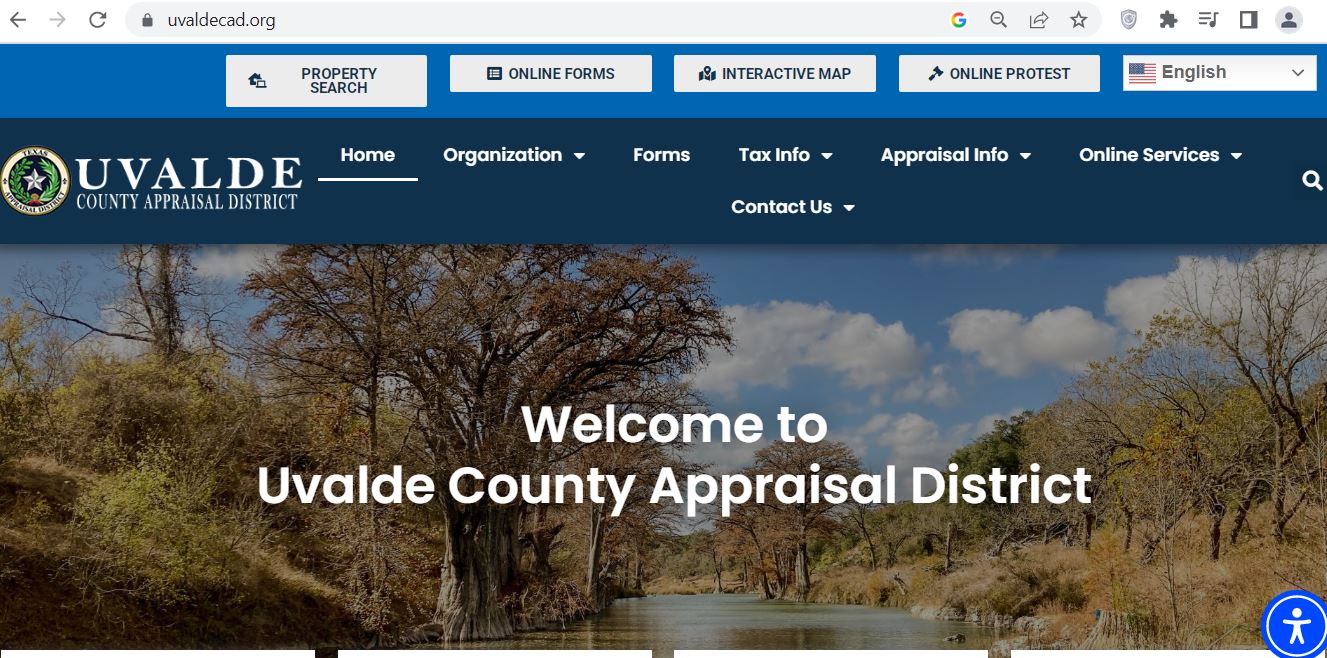
The supplied screenshot shows the official Uvalde County Appraisal District homepage. The top service bar contains direct buttons for property search, online forms, the interactive map and online protests.
Official UCAD homepage with its primary online services displayed across the top of the page.
1Confirm the domain
The browser should show uvaldecad.org and the Uvalde County Appraisal District logo.
2Select Property Search
Use this button to search by owner, address, property ID or advanced criteria.
3Select Online Forms
Register or sign in to submit available exemptions, applications and taxpayer requests.
4Select Interactive Map
Open the GIS after finding the correct property ID and legal description.
5Select Online Protest
Use the electronic protest system only for an eligible account and before its filing deadline.
6Use the language menu
The top-right language selector can translate navigation and page content for easier access.
Best path from the screenshot: Select Property Search, find the account, copy the property ID and geographic ID, then use those identifiers in the forms, map, protest and payment systems.
Choose Owner, Address, ID or Advanced Search.
Use ID when you have a property number. Use Advanced Search when a rural address or common surname produces poor results.
Search an owner with fewer words.
Start with only the first or last name. Add additional words only after reviewing the initial result list.
Simplify an address.
Use the street number and main street name. Remove Road, Street, Highway, Farm-to-Market, direction and punctuation when no match appears.
Select the correct year.
Use 2026 for the current appraisal and earlier years for value or exemption comparisons.
Open every plausible account.
One owner may have a residence, ranch acreage, vacant lot, business account, manufactured home, mineral interest or multiple tracts.
Match the legal description.
Confirm the abstract, survey, subdivision, lot, block, tract and acreage.
Review the taxing entities.
Confirm the county, city, school, road-and-flood, water, college or emergency-service districts attached to the parcel.
Save a dated copy.
Print or save the full record before filing, protesting, buying, selling or paying.
Local search tip: For property near Uvalde, Sabinal, Knippa, Utopia, Concan, Reagan Wells, Montell or rural Nueces Canyon, a property ID, abstract, survey or legal-description search may work better than a postal address.
Cross-county account warning: Uvalde CISD taxpayers whose property is located in Zavala County may not find that account in UCAD’s standard online results. Call UCAD at 830-278-1106 for the correct amount and payment route.
Five Checks Before You Use a UCAD Result
Property ID
Match the appraisal notice or tax bill.
Geographic ID
Compare the complete location identifier.
Legal description
Match the abstract, survey, lot, block or tract.
Situs or acreage
Confirm the physical property, not only the mailing address.
Property type
Verify real, business, mineral or manufactured housing.
Multiple-account warning: Surface land, mineral ownership, a manufactured home and business equipment can each have a separate property ID.
Uvalde CAD Search Problems and Practical Fixes
Search Problem
What to Try
What to Verify Next
Full owner name returns nothing
Search only the first or last name.
The roll may use initials, a former name, trust or estate wording.
Recent buyer is not displayed
Search the seller or prior owner.
Compare the appraisal record with the newest County Clerk deed.
Complete rural address fails
Use only the main road name or property ID.
The appraisal situs may differ from the postal or 911 address.
Too many records appear
Add an abstract, subdivision, acreage, property type or geographic ID.
Do not select a record only because the owner name matches.
Trust or estate is missing
Search the trustee, decedent, trust, estate and former owner separately.
Use the recorded deed or probate document for exact wording.
Manufactured home is missing
Search the home owner and landowner separately.
The home and land may have different accounts or owners.
Mineral interest cannot be found
Search the mineral owner, property ID or mineral-property category.
Surface ownership does not establish mineral ownership.
Account still cannot be identified
Call UCAD with the prior owner, location and deed description.
Ask staff to confirm the property ID, geographic ID and account type.
“I am trying to identify the correct Uvalde CAD account. The current or prior owner is ______, the property is near ______, and the deed or tax document shows ______. Can you confirm the property ID, geographic ID and property type?”
How to Read a Uvalde CAD Property Record
Record Field
Plain-English Meaning
What to Check
Property ID
UCAD’s primary appraisal and tax-account number.
Use the exact number on forms, protests, calls and payments.
Geographic ID
A location-based identifier within the appraisal system.
Copy it when matching the property with GIS or collection data.
Owner name
The owner currently displayed on the appraisal roll.
Use the County Clerk deed when legal ownership must be proven.
Mailing address
The address used for appraisal and tax correspondence.
File an address correction before notices or bills are missed.
Situs address
The district’s physical-location description.
Rural situs information can differ from the mailing address.
Legal description
Abstract, survey, subdivision, lot, block or tract information.
Compare it with the deed, plat and survey before legal use.
Land market value
UCAD’s market estimate for the land.
Acreage, frontage, access, utilities, terrain, flood risk and market area.
Improvement value
Value assigned to homes, shops, barns and other structures.
Size, age, quality, condition and removed or damaged improvements.
Market value
The district’s January 1 estimate of full market value.
Compare with sales, appraisals and actual property condition.
Appraised value
Value after an applicable appraisal limitation.
A cap does not prove that the market value is accurate.
Agricultural value
Productivity-based value for qualifying open-space land.
Verify the correct acreage and qualifying land use.
Taxable value
Value remaining after exemptions and special appraisal adjustments.
Confirm every approved benefit appears for the eligible taxing units.
Taxing entities
The county, city, school, road, water, college or emergency districts taxing the parcel.
Postal-city names do not always match legal taxing boundaries.
Deed history
Basic transfer references linked to the appraisal account.
Open the actual recorded instrument for legal research.
Map and legal-description warning: UCAD appraisal records and GIS layers are produced for property-tax administration. Use recorded documents and a professional survey for legal boundaries, acreage and access.
What Uvalde County’s 2026 Appraisal Notice Says
UCAD mailed its main group of 2026 appraisal notices on April 20, 2026. Notices were issued when an account had an appraisal, market, agricultural, exemption or ownership change.
April 20, 2026
Main appraisal-notice mailing date
About 16,700
Appraisal notices mailed
$7.85 billion
Estimated countywide market value
$3.36 billion
Estimated countywide taxable value
About 2.3%
Estimated market-value increase from 2025
About 3%
Estimated taxable-value increase
About 6%
Average appraisal increase stated by UCAD
January 1, 2026
Valuation date for the appraisal year
No notice does not mean no record: Owners who did not receive a notice should still review the 2026 property account online for value, exemption or ownership changes.
2026 Appraisal Audit Checklist
Compare 2025 and 2026 market values.
Separate land changes from improvement changes.
Verify acreage and legal description.
Check building size, age and condition.
Look for newly added improvements.
Confirm demolished structures were removed.
Review homestead and veteran exemptions.
Check agricultural productivity acreage.
Review manufactured-home ownership.
Compare similar local properties.
Photograph damage or deferred maintenance.
Keep appraisals, estimates and closing documents.
2026 Uvalde City and Uvalde CISD Appraisal Work Plan
UCAD’s adopted 2025–2026 reappraisal plan identifies the Uvalde CISD–City of Uvalde area in its 2026 planning worksheet. The plan also confirms annual appraisal-review work for the 2025 and 2026 tax years.
12,008-property workload
The 2026 planning worksheet lists approximately 12,008 parcels across planned appraisal tasks.
6,446 imagery reviews
The worksheet includes mass-appraisal pictometry or aerial-image review.
2,256 field reviews
A portion of properties is scheduled for physical field-review work.
New construction
The plan includes inspections of new buildings and construction-completion checks.
193 manufactured homes
Manufactured-home field-review work is included in the planning worksheet.
803 BPP inspections
Business-personal-property accounts are included in the planned inspection workload.
Mineral appraisal
Producing oil and gas interests are appraised through contracted specialist services.
Quality review
Ratio studies, schedule testing, property-data verification and model updates are part of the annual process.
Question to ask UCAD: When a 2026 value changed, ask whether the cause was imagery review, field inspection, a building permit, new construction, land-schedule adjustment, sale analysis, exemption change or corrected account data.
How to Use the Uvalde CAD Interactive Map
Find the appraisal account first.
Copy the property ID, geographic ID, owner, legal description and acreage.
Use a current browser.
Allow the map’s scripts and geographic layers to load fully.
Search with an exact identifier.
Use the property or geographic ID when possible. Otherwise begin with the owner or situs location.
Match the selected parcel.
Compare the property number, owner, legal description, acreage and taxing units.
Review adjoining accounts.
Look for separate ranch tracts, road strips, river frontage, manufactured homes and related ownership.
Use legal records before acting.
Obtain the deed, recorded plat, title work and survey before fencing, building or resolving access.
River and flood-property warning: An online parcel line does not establish the legal river boundary, floodplain status, easement, road access or exact acreage.
Uvalde County Homestead and Property-Tax Exemptions
Exemption applications are filed with UCAD. The district provides downloadable forms and an online taxpayer portal for available applications.
Exemption or Relief
2026 Starting Point
What to Prepare
General residence homestead
The school-district exemption is $140,000 for a qualifying principal residence.
Ownership interest, primary-residence information and required identification.
Age 65 or older
Qualifying owners receive an additional $60,000 school exemption and may receive local benefits or tax ceilings.
Age, ownership and residence information.
Disabled person
Qualifying owners receive an additional $60,000 school exemption and may qualify for local relief.
Documentation meeting the statutory disability standard.
Disabled veteran
Partial or total exemptions can apply based on the qualifying statutory category and VA determination.
VA documentation, service records and survivor information when applicable.
Heir-property homestead
An occupying heir may qualify even when not individually named in a recorded deed.
Ownership affidavit, death certificate, utility bill and available court documents.
Local optional exemptions
County, city, school, road, water and other entities may grant different exemption amounts.
Review the live account instead of assuming every entity grants the same benefit.
Homestead Application Micro-Steps
Find the correct property account.
Confirm the property ID, owner, situs and legal description.
Complete all ownership sections.
Include trust, heir-property, partial-interest or manufactured-home information when relevant.
Attach required identification.
Follow the application’s driver-license, address and documentation instructions.
Submit to UCAD.
Use the secure online system, mail or an accepted office-delivery method.
Keep proof of filing.
Save the application, attachments and submission confirmation.
Verify the exemption.
Reopen the account and confirm the correct benefit appears for the correct year.
Homestead audit: UCAD may use a contracted firm to review current homestead exemptions. Owners receiving verification correspondence should follow the letter’s instructions and contact UCAD when authenticity or requested documentation is unclear.
2026 Temporary Disaster Exemption for Damaged Property
Current 2026 resource: UCAD provides a temporary-disaster-exemption application for qualifying property physically damaged by a declared disaster.
Owners whose homes, businesses, manufactured homes or income-producing property were damaged should document the condition immediately and ask UCAD which declaration, damage date and filing deadline apply.
Photograph every damaged area
Capture exterior, interior, structural, mechanical, electrical, water and debris conditions before cleanup changes the evidence.
Keep dated repair records
Save contractor estimates, insurance reports, invoices, emergency expenses and inspection findings.
Identify the correct account
Use the property ID for every damaged parcel, building, manufactured home or business account.
Use the online form
Sign in at UCAD Online Forms and select the available disaster application.
Describe the damage accurately
Explain what was damaged, when the damage occurred and whether the property remained usable.
Keep submission proof
Save the form, attachments, email, confirmation and any follow-up request from UCAD.
Do not delay: Disaster-exemption qualification and timing depend on the official declaration, the property and statutory rules. Call UCAD at 830-278-1106 for the controlling deadline.
Agricultural, Wildlife and Rural-Land Appraisal in Uvalde County
UCAD’s forms page provides the 1-d-1 open-space agricultural application, local agricultural guidance and wildlife-management resources.
Qualification Area
What Must Be Demonstrated
Useful Evidence
Primary agricultural use
Agriculture is the land’s principal qualifying use.
Livestock, grazing, crop, hay, orchard or production records.
Degree of intensity
The activity meets local standards for a typical commercial operation.
Stocking, fencing, water, feed, equipment and management records.
Historical use
The tract has the required qualifying-use history.
Prior applications, leases, receipts, aerial images and dated photographs.
Wildlife management
The land satisfies prerequisite appraisal and qualifying wildlife practices.
Wildlife plan, activity logs, maps, receipts and photographs.
Homesite separation
Residential and nonqualifying areas are separated from productive acreage.
Survey, aerial map and acreage breakdown.
Leased agricultural use
A lessee is actively performing the qualifying activity.
Signed lease, operator information and production records.
Current 1-d-1 application
Property ID for every tract
Legal description and acreage
Map showing the claimed land
Description of current use
Historical-use evidence
Livestock or production records
Lease when another person operates the land
Receipts and dated photographs
Wildlife plan when applicable
Change-of-use warning: Converting qualifying open-space land to a nonagricultural use can create additional tax consequences. Contact UCAD before subdividing, developing or changing use.
Business Personal Property, Minerals and Manufactured Homes
Business personal property
Furniture, machinery, equipment, tools, vehicles, inventory and other tangible property used to produce income may require reporting.
Oil and gas interests
Producing mineral interests are appraised separately from the surface estate through contracted specialist appraisal.
Manufactured homes
The home and land can have different owners or property IDs. Search both accounts before filing or paying.
2026 Business-Personal-Property Change
Texas provides a $125,000 exemption for qualifying income-producing tangible personal property when the applicable taxable value remains within the statutory limit.
Confirm the filing procedure: Ask UCAD whether the account still requires a rendition, exemption statement, ownership update or account-closing form.
Business Rendition Preparation Checklist
Business legal and trade names
Property or owner ID
Physical business location
Asset descriptions
Original acquisition cost
Year acquired
Disposed or retired assets
Leased equipment
Inventory and supplies
Owner or authorized-agent signature
Normal rendition timing: UCAD’s reappraisal plan lists April 15 as the standard rendition deadline and May 15 as the extended deadline. Confirm account-specific requirements directly with the district.
Separate mineral account: A surface-land search does not prove who owns the oil, gas or other mineral interest.
How to Prepare a Uvalde CAD Appraisal Protest
July 30, 2026 status: UCAD’s main 2026 protest deadline was May 22, 2026, or 30 days after a later appraisal notice was mailed. The regular protest period has generally passed.
Main notice mailing
April 20, 2026
Main deadline
May 22, 2026
Later notice
30 days after mailing
Controlling date
Deadline shown on the notice
Protest Issue
Evidence That Helps
Weak Argument to Avoid
Market value is too high
Comparable sales, appraisal, closing statement, repair estimates and condition photographs.
“My tax bill increased.”
Unequal appraisal
Comparable appraisal accounts adjusted for land, location, size, age, quality and condition.
Using one unrelated lower-valued property.
Building data is wrong
Measurements, plans, permits, dated photographs and inspection reports.
An unsupported verbal estimate.
Land or acreage is wrong
Deed, survey, plat, access limitations, terrain and utility information.
Using only an approximate GIS boundary.
Exemption was denied or removed
Application, identification, ownership and qualification documents.
Assuming the previous owner’s exemption transferred.
Agricultural appraisal was denied
Use history, lease, livestock, production, maps, receipts and photographs.
“The land is rural, so it qualifies.”
UCAD Protest Micro-Steps
Read the complete notice.
Record the property ID, proposed value, reason for change and filing deadline.
Save the current appraisal record.
Review land, buildings, exemptions, agricultural value and account history.
Identify each issue separately.
Separate market value, unequal appraisal, factual errors, exemption and agricultural arguments.
State the requested result.
Give a supported value, classification, exemption or correction.
Use written filing when necessary.
A protest may be mailed, placed in UCAD’s night deposit box or emailed to appeals@uvaldecad.org.
Label the evidence clearly.
Use titles such as “Roof Damage,” “Comparable Sale 1,” “Flood Damage” or “Incorrect Acreage.”
Keep proof of filing.
Save the portal confirmation, sent email, attachments or accepted delivery record.
Request UCAD’s evidence.
Ask for the appraisal card, schedules, sales and other material the district plans to present.
Electronic protest limitation: Owners wanting an informal discussion should confirm whether the electronic filing system supports direct appraiser communication or whether a written filing is more suitable.
Portal problem: When the online-protest system does not work, contact UCAD immediately and retain proof of any emailed protest and supporting evidence.
What to Do After the Uvalde CAD Protest Deadline
A late filing does not automatically receive a normal protest hearing. A limited correction or late remedy may still apply depending on the notice history, type of error and tax-payment status.
Required notice was not received
Explain when the value was discovered and verify the mailing address UCAD used.
Clerical or ownership error
Ask whether an incorrect owner, duplicate account, mailing address or property description qualifies for correction.
One-third over-appraisal motion
UCAD’s Forms page provides a motion for qualifying substantial appraisal errors.
Late exemption filing
Certain homestead, age-65, disability and veteran exemptions have separate late-filing rules.
Damaged-property relief
Owners affected by a declared disaster should ask about the temporary disaster exemption.
Taxes remain due
An appraisal issue does not automatically stop penalty, interest or collection action.
“I missed the regular protest deadline for property ID ______ because ______. Please confirm whether a missing-notice protest, appraisal-roll correction, one-third over-appraisal motion, disaster exemption or late-exemption provision may apply.”
Act promptly: Give UCAD the property ID, tax year, notice history, exact error and current payment status.
How to Search and Pay Uvalde County Property Taxes
UCAD collects property taxes for participating taxing units and provides online, telephone, mail, drop-box and office-payment options.
Search by last name or property ID.
A property ID is the safest method when several accounts have similar owners.
Select View Details.
Open the details beside the appraised value for the correct account.
Select Pay Taxes.
Use the payment button inside the property-details window.
Choose the tax year.
Review every unpaid year and enter the amount to apply.
Select Proceed to Payment Cart.
Confirm that the correct account and year were added.
Verify the billing information.
Review the property, amount, payer information and convenience fee.
Submit and save proof.
Keep the confirmation number, date, property ID, tax year and amount.
Verify posting.
Recheck the account or contact UCAD when a receipt or exact payoff is required.
Pay by telephone
Call 866-549-1010
Bureau code: 6076174
Credit-card convenience fee
UCAD’s payment instructions list a percentage-based card fee. Review the live checkout total before authorizing payment.
UCAD collection office
209 N. High Street
Uvalde, TX 78801
2026 tax-rate timing: Proposed and adopted tax-rate information is generally updated during August and September. A 2025 rate or tax bill is not proof of the final 2026 tax.
Delinquent account warning: By July 2026, unpaid 2025 taxes can include penalty, interest and collection charges. Call UCAD for an exact payoff before sending payment.
“I need the current payoff for UCAD property-tax account ______ through ______. Please confirm every unpaid year, penalty, interest, collection charge and accepted payment method.”
How a Uvalde County Property-Tax Bill Is Built
1. Market value
UCAD estimates January 1 market value.
2. Taxable value
Exemptions, limitations and agricultural value are applied.
3. Taxing-unit rates
County, city, school, road, water, college and emergency-service rates may apply.
4. Final tax
Each entity applies its adopted rate to its taxable value.
UCAD does not set tax rates: Each local taxing entity adopts its own rate. UCAD appraises property and administers or collects the resulting accounts.
UCAD vs County Tax Office vs County Clerk
Your Task
Correct Starting Office
Why
Find an appraisal account
Uvalde CAD
UCAD maintains property values and appraisal records.
Correct building or land information
Uvalde CAD
UCAD maintains appraisal characteristics.
Apply for an exemption or agricultural appraisal
Uvalde CAD
The chief appraiser determines eligibility.
Protest a value or denial
UCAD / Appraisal Review Board
The ARB hears qualifying appraisal disputes.
Pay participating property taxes
UCAD Collections
UCAD provides the property-tax search and payment system.
Register or title a vehicle
County Tax Assessor-Collector
The county office handles motor-vehicle services.
Find a deed, lien or easement
Uvalde County Clerk
The Clerk records official real-property documents.
Confirm legal boundaries or title
Surveyor, title company or attorney
CAD maps and one recorded deed do not resolve every legal issue.
How to Search Uvalde County Deeds and Official Records
The Uvalde County Clerk provides access to deeds, liens, releases, plats and other recorded property documents.
Save the UCAD account details.
Copy the owner, property ID, geographic ID and legal description.
Hours
Monday–Friday
8:00 a.m.–4:30 p.m.
Open during lunch
Title warning: Finding one deed does not prove that no mortgage, lien, easement, probate issue, mineral reservation or later filing affects the property.
Uvalde County Buyer and New-Owner Checklist
Appraisal account
Property and geographic IDs
Owner and mailing address
Legal description
Acreage and land class
Building characteristics
Every related account
Taxes and exemptions
Current tax balance
Prior-year balances
Penalty and interest
Homestead status
Agricultural appraisal
Special cross-county account
Title and land review
Latest recorded deed
Liens and releases
Easements and restrictions
Survey and legal access
Flood and drainage information
Utilities, septic and permits
Purchase-year warning: The seller’s homestead cap, age-65 ceiling, disabled-veteran exemption, agricultural appraisal or tax deferral does not automatically transfer to the buyer.
Practical Uvalde County Property Scenarios
City of Uvalde residence
Review 2026 building characteristics, homestead status, imagery or field-review changes and disaster damage.
Sabinal property
Confirm the city, school, county and road-and-flood entities and verify every applicable exemption.
Knippa-area acreage
Match the abstract, tract, agricultural-use history, homesite acreage and access.
Concan or river property
Review flood damage, access, terrain, river influence, restrictions and separate tracts.
Mineral interest
Search the mineral account separately and do not assume the surface owner owns the mineral estate.
Inherited family land
Compare the UCAD owner with probate and recorded deeds. Changing a mailing address does not transfer title.
Uvalde County Property Office Contacts
Appraisal, exemptions, protests and property taxesUvalde County Appraisal District
209 N. High Street
Uvalde, TX 78801-5207
Return to live official records
Use UCAD or the County Clerk whenever you need a current owner, appraisal, tax balance, deadline, map or recorded document.
Uvalde County CAD Property Search FAQs
1. What is the official Uvalde County CAD website?
The official Uvalde County Appraisal District website is uvaldecad.org. It links the property search, online forms, interactive map, protest portal, tax-payment instructions and tax-transparency system.
2. Where is Uvalde County Appraisal District located?
UCAD is located at 209 N. High Street, Uvalde, Texas 78801-5207. Its main phone number is 830-278-1106.
3. Who is the Uvalde CAD Chief Appraiser?
The official UCAD website lists Roberto Valdez, RPA as Chief Appraiser.
4. How do I search Uvalde County property records?
Open esearch.uvaldecad.org and search by owner, address, property ID or advanced criteria. Verify the property ID, geographic ID, legal description, situs, acreage and property type before relying on the record.
5. When were Uvalde County’s 2026 appraisal notices mailed?
UCAD mailed its main group of 2026 appraisal notices on April 20, 2026. About 16,700 notices were issued for appraisal, market, agricultural, exemption or ownership changes.
6. What was the main Uvalde CAD protest deadline for 2026?
The main deadline was May 22, 2026, or 30 days after a later appraisal notice was mailed. The deadline printed on the owner’s notice controls.
7. Does UCAD offer a temporary disaster exemption?
UCAD provides a temporary-disaster-exemption application for qualifying property physically damaged by a declared disaster. Owners should contact UCAD promptly to confirm eligibility and the filing deadline.
8. Where do I pay Uvalde County property taxes?
Begin with the UCAD property-search system. Open the correct account, choose View Details, select Pay Taxes, choose the tax year and proceed to the payment cart.
9. How can I pay Uvalde County property taxes by phone?
Call 866-549-1010 and use bureau code 6076174. Review the payment processor’s current convenience fee before authorizing payment.
10. Is the Uvalde CAD map legal proof of a property boundary?
No. UCAD’s appraisal and GIS maps are research tools. Use recorded deeds, plats, title research and a licensed surveyor for legal ownership, access, acreage and boundary questions.
Independent Guide Disclaimer
County-CAD.org is an independent informational guide. It is not affiliated with Uvalde County Appraisal District, the Uvalde County Appraisal Review Board, Uvalde County Tax Assessor-Collector, Uvalde County Clerk, any taxing unit, payment processor or the State of Texas.
Property values, disaster-relief deadlines, exemptions, personnel, office hours, protest procedures, tax rates, payment fees, balances and online systems can change. Verify time-sensitive information with the responsible official office before filing, paying, purchasing property or taking legal action.