
Johnson County CAD property search, appraisal value, exemptions and tax help
Use this Johnson County CAD guide to search official property records, check a parcel by owner, address, ID or advanced search, and understand what appraisal value, exemptions, renditions, online protest, tax payments and deed records mean before you contact the wrong office.
Start with the Central Appraisal District of Johnson County for appraisal records, exemptions, ownership or mailing changes, agricultural questions, business personal property and protest matters. For tax bills, payment confirmation and receipts, use the Johnson County Tax Office search and pay portal.
Quick answer: where to search Johnson County CAD property records
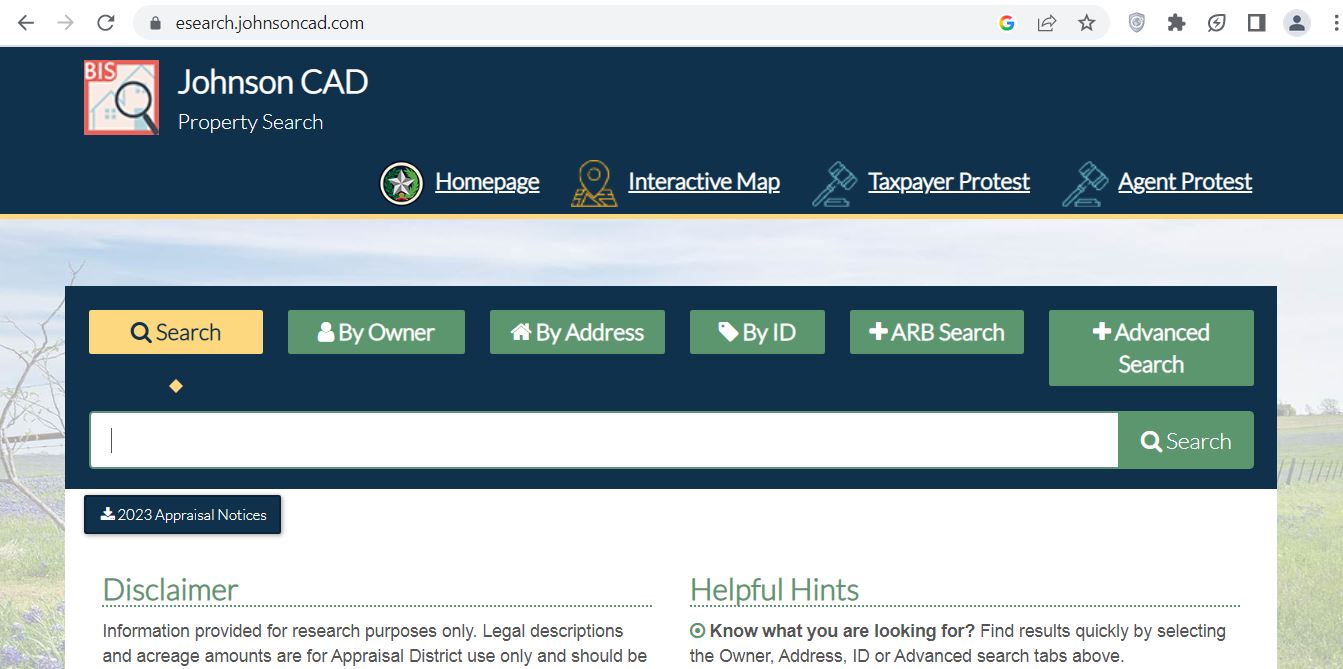
The official Johnson County CAD property search is the Central Appraisal District of Johnson County eSearch portal. It provides Owner, Address, ID and Advanced Search tabs, so users can look up appraisal records with the information they already have.
Use Johnson CAD for appraisal value, exemptions, agricultural appraisal, business personal property, mailing or ownership updates and value protests. Use the Johnson County Tax Office for property tax bills, payments, receipts, payment options and tax account questions.
Quick navigation for Johnson County property owners
Johnson County CAD screenshot guide
The screenshot below helps users recognise the Johnson County CAD topic and understand where a property-record lookup begins. Use it as a visual guide only. Live appraisal values, exemptions, notices, protest status and payment balances should always be checked on official Johnson CAD or tax office resources.
How to use Johnson County CAD property search step by step
The official Johnson CAD property search is the best first stop for appraisal records. Before calling, filing a protest, applying for exemption or checking tax payment, search your property and save the account details.
What Johnson CAD property record fields mean
A property record is more useful when you know what each field is for. Do not use appraisal records as a substitute for tax receipts, deed documents, legal title research or survey work.
| Record field | What it usually means | How to use it |
|---|---|---|
| Property ID / account | Unique Johnson CAD record reference | Use it when calling CAD, searching taxes, filing protest or saving evidence. |
| Owner name | Owner shown in appraisal records | Recent sales may take time to update. Use county records for legal ownership confirmation. |
| Property address | Physical or situs address used for appraisal purposes | Confirm city/community and road name carefully, especially with rural routes or similar street names. |
| Legal description | Lot, block, subdivision, abstract or tract description | Helpful for parcel identity, but use official records for legal document decisions. |
| Market value | CAD opinion of the property’s market value | Compare with similar sales, condition, location, size and property type. |
| Appraised value | Value after appraisal limitations may apply | For homestead property, this may differ from market value because of Texas limitation rules. |
| Land value | Value assigned to land | Review acreage, frontage, location, ag-use status, access and land classification. |
| Improvement value | Value assigned to buildings and improvements | Check square footage, year built, condition, garages, shops, barns, pools and remodel assumptions. |
| Exemption status | Homestead, over-65, disabled person, disabled veteran, ag/timber or other exemption/appraisal information | Missing exemptions or classification issues can affect taxable value and should be checked early. |
Official Johnson CAD tools and pages to use first
Use official Johnson CAD pages for appraisal records, protests, forms, exemptions, ag, business personal property and taxpayer contact. Use the Johnson County Tax Office only when your task is tax payment, tax receipt or tax account status.
| Official resource | Best for | Practical tip |
|---|---|---|
| Property Search | Finding owner, address, ID, legal description, value and appraisal details | Start here before calling so you have the property ID or account details ready. |
| Online Protest Portal | Owner or agent protest filing when the portal is open | If the portal says closed, follow current notice/form instructions and contact CAD if needed. |
| Contact Page | Customer service, exemptions, BPP, ag, ARB and feedback emails | Use the correct department email instead of sending every issue to one inbox. |
| Tax Office Search & Pay | Property tax bills, online payments, receipts and tax account searches | Use account number, owner name, owner address or property location to search taxes. |
| County Clerk Records | Deeds, liens, recorded real property documents and public records | CAD records are not legal title records; use official records for deed research. |
Johnson County homestead exemption, ag and BPP guidance
Before filing a protest, check whether your exemptions and special appraisal status are correct. A missing residence homestead exemption, over-65 exemption, disabled person exemption, disabled veteran exemption, ag/timber classification or business personal property issue can affect the final tax result more than a small value dispute.
How to prepare a stronger Johnson County CAD protest
A useful protest is not simply “my taxes are high.” Johnson CAD and the Appraisal Review Board focus on appraisal value, unequal appraisal, incorrect property details, exemption issues or other district actions. Your evidence should match your protest reason.
Evidence checklist for a Johnson CAD appraisal protest
Good evidence is clear, dated and property-specific. Your goal is to show why the appraisal record should be changed, not just that the final tax bill feels high.
- Recent comparable sales in the same market area
- Photos of condition, damage, roof, foundation or repair issues
- Repair estimates from contractors
- Closing statement or recent purchase price
- Independent appraisal or agent market analysis
- Wrong square footage
- Wrong acreage or land classification
- Incorrect pool, garage, shop, barn or outbuilding details
- Wrong year built or condition rating
- Incorrect property class or business personal property issue
- “My taxes are too high” only
- Random online estimates without local adjustment
- Comps from a different city or school district
- Old sales from a different market year
- Photos without address, date or explanation
Johnson CAD vs Tax Office vs County Clerk: which one do you need?
This is one of the most important parts of the guide. Johnson CAD, the Johnson County Tax Office and the County Clerk handle different tasks. Use the table before calling or clicking.
| User needs | Correct place | What to do |
|---|---|---|
| Search appraisal value or property account | Central Appraisal District of Johnson County | Use property search by Owner, Address, ID or Advanced Search. |
| File exemption, ag, BPP or rendition questions | Johnson CAD | Use the relevant CAD department email or official forms/portal route. |
| File an appraisal protest | Johnson CAD / Appraisal Review Board process | Use official protest portal/form instructions and save proof. |
| Pay property taxes or verify payment | Johnson County Tax Office | Use the official tax office search and pay portal. |
| Find deed, lien or recorded document | Johnson County Clerk / official online records | Use county online records for deeds, liens and recorded instruments. |
Local insider tips for Johnson County property owners
Johnson County has fast-growth suburban areas, older city homes, rural tracts, agricultural property, manufactured homes, business personal property accounts and commercial corridors. A good property search should consider property type, not only the value number.
- Compare similar age, condition and neighborhood
- Check improvement value after remodels or additions
- Confirm homestead status after purchase
- Fast-growth subdivisions may show rapid value movement
- Use same-area comparable sales where possible
- Check school district, subdivision and property size carefully
- Review acreage, land class and ag/timber details
- Check barns, shops, wells, fencing and outbuildings separately
- Use map and legal description for parcel identity
Common Johnson CAD mistakes to avoid
These mistakes make property-search, protest and tax-payment tasks harder than needed.
| Mistake | Why it hurts | Better action |
|---|---|---|
| Using CAD value page as tax receipt | CAD appraisal records do not prove payment status. | Use the Johnson County Tax Office search and pay portal for bills, payments and receipts. |
| Searching with too much address text | Street abbreviations, rural road names and subdivision wording can block results. | Try a simpler address or use Owner, ID or Advanced Search. |
| Ignoring exemption status | Missing exemptions can affect taxable value significantly. | Check exemptions before focusing only on market value protest. |
| Filing a protest without evidence | ARB decisions need support, not only opinion. | Prepare comps, photos, repair estimates and record-error proof before filing. |
| Using CAD as deed proof | Appraisal records are not legal title records. | Use Johnson County Clerk official online records for deeds and liens. |
Documents and details to keep ready
Before searching, calling, filing or paying, keep these details ready. It saves time and reduces wrong-account confusion.
Central Appraisal District of Johnson County contact details
| Contact item | Official detail | Use this for |
|---|---|---|
| Office | Central Appraisal District of Johnson County | Appraisal records, exemptions, value questions, property search help and protest process. |
| Physical address | 109 N. Main St., Cleburne, TX 76033 | Office visits, document delivery, ARB/protest matters and map directions. |
| Phone | 817-648-3000 | General property information, exemptions, appraisals and department routing. |
| Fax | 817-645-3105 | Faxed forms where accepted by the district. |
| Customer service email | customerservice@johnsoncad.net | General appraisal district questions. |
| Department emails | exemptions@johnsoncad.net, bpp@johnsoncad.net, ag@johnsoncad.net, arb@johnsoncad.net | Exemptions, business personal property, agricultural appraisal and ARB/protest-related routing. |
| Hours | Monday–Friday, 8:00 AM–4:30 PM | Office visits and phone support; check holiday closures before traveling. |
Johnson CAD office map
Use the map below for directions to the Central Appraisal District of Johnson County in Cleburne. For deadline-sensitive protests, exemptions or document delivery, confirm current office procedure before visiting.
Helpful Texas appraisal protest video resource
For protest preparation, use the official Texas Comptroller ARB hearing video resources as general learning material. For your actual Johnson County property, follow Johnson CAD’s official protest portal, notice instructions, evidence route and deadline.
▶ Open the Texas Comptroller homeowner ARB hearing video resourceOfficial Johnson County property resources
Use these official links for final confirmation before filing, paying, protesting, applying for exemptions or searching recorded documents.
Central Appraisal District of Johnson County official website Official Johnson CAD property search Official Johnson CAD contact page Official Johnson CAD online protest portal Official Property Owner’s Notice of Protest form Johnson County Tax Office official website Official Johnson County search and pay property tax page Official Johnson County property tax payment options Johnson County Clerk online records Johnson County truth-in-taxation searchJohnson County CAD property search FAQs
What is the official Johnson County CAD property search website?
The official Johnson County CAD property search is available through the Central Appraisal District of Johnson County eSearch portal at esearch.johnsoncad.com. Users can search by Owner, Address, ID or Advanced Search.
What is the Johnson CAD phone number?
The official Central Appraisal District of Johnson County phone number is 817-648-3000. The district fax number is 817-645-3105.
Where is Johnson County CAD located?
Johnson CAD is located at 109 N. Main St., Cleburne, TX 76033. Confirm current office procedure before visiting during holidays or protest season.
How do I search Johnson County property records by address?
Open the official Johnson CAD property search and choose the Address tab. If the result does not appear, try a simpler search such as only the street name, or use owner name, property ID or Advanced Search.
Can I search Johnson County CAD by owner name?
Yes. The official Johnson CAD property search includes an Owner tab. If too many results appear, try fewer words or only the first or last name, then confirm the correct property address and account.
Does Johnson CAD collect property taxes?
Johnson CAD appraises property and handles appraisal records, exemptions, renditions, ownership/mailing changes and protests. Property tax bills, payments and receipts are handled by the Johnson County Tax Office.
How do I file a Johnson CAD protest?
Use Johnson CAD’s official online protest portal when available, or follow the protest form and notice instructions. Prepare comparable sales, photos, repair estimates, property-detail corrections and an opinion of value before filing.
What evidence helps in a Johnson County appraisal protest?
Helpful evidence includes comparable sales, photos of property condition, repair estimates, closing statements, independent appraisal reports, proof of wrong square footage, land classification documents and other record-error proof.
Where do I pay Johnson County property taxes online?
Use the official Johnson County Tax Office search and pay portal. Do not treat the CAD appraisal record as a property tax receipt.
Where do I find Johnson County deed records?
Use Johnson County Clerk online records for deeds, liens and recorded documents. Johnson CAD appraisal records are not a legal title search.
Last editorial check: June 2026. Official details, forms, phone numbers, protest rules and account data can change without notice; confirm directly with Johnson CAD or the relevant official office before filing, paying, appealing or visiting.