Search Tom Green County Property Records, Review the 2026 Appraisal and Pay the Correct Tax Account
Use this guide to find an official Tom Green County Appraisal District account, compare 2026 land and improvement values, verify exemptions, open the Map/GIS tool, prepare a protest or correction request and review property-tax balances.
Tom Green CAD has an unusual combined role: it appraises property and also collects property taxes for participating local taxing units. The County Tax Assessor-Collector primarily handles vehicle services, while recorded deeds and liens belong with the Tom Green County Clerk.
Quick Answer: Which Tom Green County Office Should You Use?
Use Tom Green CAD for
Property searches, market value, building and land data, exemptions, agricultural appraisal, business personal property, parcel mapping, appraisal protests and participating property-tax accounts.
Use Tom Green CAD Tax Summary for
Tax statements, entity-by-entity tax details, paid or unpaid balances, receipts and the official online property-tax payment link.
Use the County Tax Assessor-Collector for
Vehicle titles, registration renewals, license plates, disabled placards and related motor-vehicle services—not the normal property-tax search.
Use the County Clerk for
Recorded deeds, deeds of trust, liens, judgment abstracts, easements, powers of attorney, plats and other official real-property documents.
Use the ARB protest system for
Filing an eligible appraisal protest, reviewing protest instructions and preparing for an informal review or Appraisal Review Board hearing.
Use a licensed surveyor for
Exact property corners, acreage, boundaries, encroachments, fence locations and legal access questions.
Important local routing rule: Do not send a Tom Green County property-tax payment to the County Tax Assessor-Collector simply because that office handles taxes in many other Texas counties. Begin with the Tom Green CAD property account and its Tax Summary tab.
Start Here: Choose the Tom Green County Task You Need
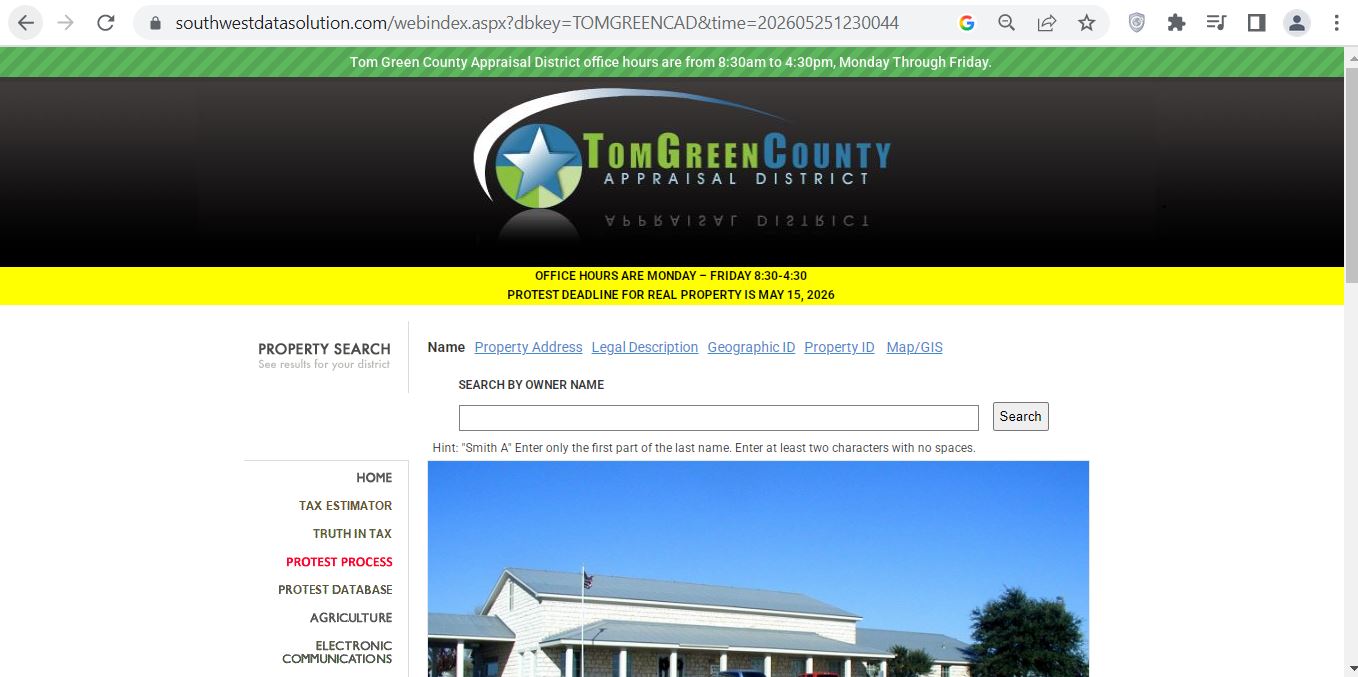
The supplied screenshot shows the Tom Green County Appraisal District website and its main taxpayer-service navigation. The site combines property-search links, Map/GIS access, protest information, forms, agricultural guidance, tax tools and payment instructions.
Tom Green CAD website screenshot used to identify the official property-search, mapping, protest, forms and tax-payment routes.
1Verify the official office
Confirm the page identifies Tom Green County Appraisal District and shows the 2302 Pulliam Street contact information.
2Choose a search type
Use Name, Property Address, Legal Description, Geographic ID or Property ID according to the information you already have.
3Check the deadline notice
The 2026 site displays a May 15 real-property protest deadline. The individual appraisal notice remains the controlling account-specific document.
4Use Map/GIS after searching
Copy the property and geographic IDs first so you can verify that the selected map parcel matches the appraisal account.
5Open Protest Process
Use this area for online-protest instructions, informal review, ARB procedures, evidence affidavits and agent information.
6Open Downloads and Forms
Use this menu for current homestead, agricultural, rendition, protest, electronic-delivery and other applications.
Best route from the screenshot: Search the account, save the property ID, geographic ID and legal description, review the 2026 value and exemptions, and then open the Tax Summary, Map/GIS, protest or forms area needed for the next action.
How to Search Tom Green County CAD Property Records
Begin an owner search with the last name.
The search hint uses a format such as “Smith A.” Enter the first part of the last name and add an initial only when needed.
Enter at least two characters.
The owner search instructs users to enter at least two characters with no spaces when beginning a name search.
Simplify an address search.
Enter the street number and main street name. Do not initially add Street, Drive, Lane or another street type.
Try less information when no result appears.
Remove a direction, unit number, punctuation or street suffix and search again.
Use the property ID when available.
A prior tax statement, appraisal notice, closing file or saved property record may provide the most reliable account identifier.
Use geographic ID or legal description for land.
These searches can help with rural tracts, subdivisions, lots, blocks, abstracts and properties without a dependable street address.
Open every plausible result.
One owner may have a residence, vacant lot, business-personal-property account, manufactured home, mineral interest or several tracts.
Check the property year.
Review the 2026 tab for the current appraisal and prior years for value, exemption and account-history comparison.
Save the complete account.
Print or save the property page, appraisal notice, value history and Tax Summary before filing, protesting, purchasing or paying.
Local search tip: For San Angelo addresses, begin with the street number and core street name. For Christoval, Grape Creek, Wall, Water Valley, Veribest, Carlsbad or rural acreage, the property ID, geographic ID or legal description may produce a cleaner match.
Five Checks Before You Use a Tom Green CAD Result
Property ID
Match the notice, statement or saved account.
Geographic ID
Confirm the appraisal and map identifier.
Owner wording
Check names, initials, trusts and estates.
Legal and situs
Match the physical property and deed description.
Account type
Verify real, business, mineral or manufactured property.
Multiple-account warning: A house, adjoining lot, business equipment, manufactured home and mineral interest may appear under different property IDs even when they involve the same owner or location.
Tom Green CAD Search Problems and Practical Fixes
Search Problem
What to Try
What to Verify
Complete owner name returns nothing
Use the first part of the last name and one initial.
The roll may use initials, a spouse, trust, estate or business wording.
A recent buyer is missing
Search the seller or former owner.
Compare the appraisal account with the newest recorded County Clerk deed.
Full address gives no result
Remove the street type, direction and unit number.
The appraisal situs may use a different address format.
Too many name results appear
Add an initial or compare property address, legal information and property ID.
Do not select an account only because the owner name is similar.
Rural tract has no useful address
Search by legal description, geographic ID, property ID or prior owner.
Match the abstract, survey, tract and acreage.
Manufactured home is missing
Search the landowner and home owner independently.
The land and home may have separate records.
Business account is missing
Search the legal business name, DBA, owner and physical location.
Real estate and income-producing personal property are separate accounts.
Property still cannot be identified
Call Tom Green CAD with the prior owner, location, legal description and old account number.
Ask staff to confirm the property ID and account type.
“I am trying to identify the correct Tom Green CAD account. The current or prior owner is ______, the property is near ______, and my deed, notice or tax statement shows ______. Can you confirm the property ID, geographic ID and legal description?”
How to Read a Tom Green County Property Record
Record Field
Plain-English Meaning
What to Check
Property ID
The appraisal district’s account identifier.
Use it for calls, forms, protests, mapping and payment research.
Geo ID
A location-based identifier used by the appraisal and mapping systems.
Compare it before opening or relying on a mapped parcel.
Owner and ownership interest
The owner wording and ownership percentage shown on the appraisal account.
Use a recorded deed or probate order when legal ownership must be established.
Mailing address
Where notices and tax correspondence may be sent.
Correct it promptly when outdated.
Situs
The physical property location in the appraisal database.
It can differ from postal formatting.
Legal information
Subdivision, lot, block, abstract, survey, tract, condominium or acreage description.
Compare it with the deed, plat or survey.
Improvements
Value assigned to houses, commercial structures and other buildings.
Size, age, construction, quality, condition and removed improvements.
Land
The market-value component assigned to the site or acreage.
Location, size, access, utilities, frontage, flood influence and land classification.
Market value
The district’s estimate of January 1 market value.
Compare with sales evidence and the property’s actual condition.
Appraised value
Value after an applicable statutory appraisal limitation.
A cap can limit taxable growth without proving the market value is correct.
Qualified exemptions
Homestead, age-65, disability, veteran or other approved relief.
Confirm each exemption appears for the correct owner and year.
Tax Summary
Property-tax bills, payments, balances and receipts attached to the account.
Review every year and entity before making a payment.
Property alert
An account-specific warning such as preliminary or uncertified 2026 values.
Do not assume a displayed value is certified when the alert says otherwise.
Research-only warning: The appraisal account, legal description, acreage and Map/GIS display are designed for tax administration. Verify title, boundaries and acreage independently before legal or construction use.
Tom Green County’s 2026 Property-Appraisal Cycle
Tom Green CAD’s 2026 website publishes May 15, 2026 as the real-property protest deadline. The deadline printed on the individual Notice of Appraised Value controls when a different statutory date applies.
January 1, 2026
Ownership, taxable location, use and market conditions are generally measured for the tax year.
April 15, 2026
Regular business-personal-property rendition deadline unless a valid extension applies.
April 30, 2026
Normal filing date for many exemption and 1-d-1 agricultural applications.
May 15, 2026
Tom Green CAD’s published real-property protest deadline.
May–July 2026
Informal reviews and Appraisal Review Board hearings are generally conducted.
Summer 2026
The appraisal roll is reviewed, adjusted and prepared for certification.
August–September
Local taxing units consider proposed and adopted tax rates.
Fall 2026
Tax statements become available after certified values and adopted rates are loaded.
July 30, 2026 status: The May 15 regular protest deadline has passed. Some live 2026 accounts can still display a preliminary or not-certified alert, so verify the status of the specific property before a closing, tax estimate or legal filing.
Rate warning: A prior-year tax rate or tax bill is useful for estimating but is not the final 2026 bill. The final amount depends on the certified taxable value and each entity’s adopted 2026 rate.
What Tom Green CAD Reviews During the 2026 Appraisal
Tom Green CAD’s mass-appraisal process uses property characteristics, market data, cost information and neighborhood analysis to appraise property equally and uniformly. The district also publishes reappraisal plans, annual reports, appraisal manuals and local market-area materials.
Residential property
Building size, age, quality, condition, construction type, neighborhood and comparable sales can affect value.
Commercial property
Cost, market sales, occupancy, rent, expenses and income information may be considered.
Land and acreage
Location, frontage, access, utilities, size, topography and highest-and-best-use analysis can affect value.
New construction
Building activity, permits, inspections, aerial imagery and field review can identify additions or new improvements.
Agricultural land
Soil classification, primary use, intensity, historical use and local productivity information are relevant.
Business property
Equipment, machinery, furniture, inventory, leased assets and other income-producing personal property are reviewed separately.
2026 Property Audit Checklist
Compare 2025 and 2026 market values.
Separate the land and improvement changes.
Confirm the property and geographic IDs.
Verify the legal description and acreage.
Check building square footage.
Review age, quality and condition.
Look for incorrectly added structures.
Confirm demolished buildings were removed.
Verify homestead and other exemptions.
Check agricultural qualifying acreage.
Search for separate business accounts.
Save photos and repair estimates.
“Property ID ______ changed from ______ in 2025 to ______ in 2026. Please identify the land, improvement, exemption, inspection or appraisal-model change that caused the difference.”
How to Use the Tom Green CAD Map/GIS
Locate the appraisal account first.
Copy the property ID, geographic ID, owner name, situs and legal description.
Use a supported browser.
The map recommends a current version of Chrome or Firefox and can display an unsupported-browser warning in older compatibility modes.
Search with an exact identifier.
A property ID or geographic ID is generally more reliable than a common owner or rural street name.
Match the selected parcel.
Compare its account number, owner, situs and legal information with the property-search page.
Review adjacent accounts.
Look for separate lots, access strips, condominium interests, business parcels, homesites and related ownership.
Verify before acting.
Use the recorded deed, plat, title work and licensed surveyor before fencing, building or resolving an access dispute.
Boundary warning: The Map/GIS parcel line is an appraisal reference. It does not establish a legal property boundary, easement, right of way or building location.
Tom Green County Homestead and Property-Tax Exemptions
Exemption applications are filed with Tom Green County Appraisal District. Use the current application listed under the official Downloads and Forms menu rather than an old saved copy.
Exemption or Relief
2026 Starting Point
What to Prepare
General residence homestead
Texas school districts provide a mandatory $140,000 exemption on a qualifying principal residence.
Ownership, principal-residence information and required identification.
Age 65 or older
Qualifying owners receive an additional mandatory $60,000 school exemption and may qualify for a school-tax ceiling.
Age, ownership and residence information.
Disabled person
A qualifying disabled owner may receive the additional school exemption and applicable ceiling protection.
Documentation meeting the statutory disability standard.
Disabled veteran
Partial or total relief may apply according to the qualifying disability or survivor category.
VA documentation and applicable service, disability or survivor records.
Heir-property homestead
An occupying heir may qualify even when every heir is not listed individually in the deed record.
Ownership affidavit, death certificate, utility record and available probate documents.
Local optional exemptions
County, city, school and special districts can grant different local benefits.
Review each taxing entity shown on the live property account.
Homestead Application Micro-Steps
Find the correct property ID.
Confirm the owner, situs, legal description and ownership interest.
Open the official forms area.
Go to Tom Green CAD and select Downloads and Forms.
Select Form 50-114.
Use the current Residence Homestead Exemption Application.
Review identification requirements.
Follow the current form’s driver-license, state-ID and property-address instructions.
Complete special ownership sections.
Include trust, heir-property, partial-interest, spouse or manufactured-home information when applicable.
Attach supporting records.
Include every document required by the current application.
Submit to Tom Green CAD.
Deliver, mail or electronically submit the form through a method currently accepted by the district.
Keep proof of filing.
Save the signed application, attachments and delivery confirmation.
Verify approval.
Reopen the property account and confirm the exemption appears for the correct year and entities.
New-owner warning: A seller’s homestead exemption, appraisal cap, age-65 ceiling or tax deferral does not automatically transfer to the buyer.
Agricultural and Wildlife Appraisal in Tom Green County
Tom Green CAD explains that qualifying land must be devoted principally to agricultural use. A secondary or occasional activity does not qualify when residential, recreational or another competing use is the property’s primary use.
Qualification Area
What Must Be Shown
Useful Evidence
Primary use
Agriculture is the land’s principal and most important use.
Production records, livestock records, crop records and management activity.
January 1 use
The land was currently devoted to qualifying agricultural use on January 1.
Dated photographs, receipts, feeding, planting or production records.
Degree of intensity
The operation meets locally typical intensity standards.
Stocking rates, fencing, water, equipment and management records.
Historical use
The tract has the required qualifying-use history.
Prior applications, leases, tax records, aerials and receipts.
Wildlife management
The land satisfies the prerequisite appraisal and required wildlife practices.
Wildlife plan, activity logs, maps, receipts and photographs.
Homesite separation
Residential and other nonqualifying areas are separated from agricultural acreage.
Survey, aerial map and acreage breakdown.
Leased operation
The lessee performs an actual qualifying agricultural operation.
Signed lease and operator production records.
Agricultural Application Checklist
Current Form 50-129 application
Property ID for every tract
Legal description and acreage
Map of the claimed land
Current agricultural-use description
Qualifying-use history
Livestock or crop records
Lease when another person operates the land
Receipts and dated photographs
Wildlife plan when applicable
Local assistance: Tom Green CAD publishes an Agricultural FAQ and appraisal guidance. Agriculture-related questions may be directed to agriculture@tomgreencad.com.
Change-of-use warning: Changing qualifying agricultural land to a nonqualifying use can create additional tax consequences. Obtain property-specific guidance before changing the use, subdividing or developing the tract.
Business Personal Property, Minerals and Manufactured Homes
Business personal property
Furniture, machinery, equipment, tools, inventory, supplies and other income-producing tangible property may require a rendition.
2026 personal-property exemption
Texas provides a $125,000 exemption for qualifying tangible personal property held or used for income production in each taxing unit.
Mineral interests
Mineral, royalty and leasehold interests can have different owners and separate property IDs from the surface estate.
Manufactured homes
Search the home owner and landowner separately. The home and underlying land may appear under different records.
Closed or moved businesses
Notify the district of the closing date, asset disposition and new location rather than assuming the account closes automatically.
Business correspondence
Tom Green CAD publishes bpp@tomgreencad.com for business-personal-property correspondence.
Business Rendition Preparation
Business legal and trade names
Property or owner ID
Physical business location
Asset descriptions
Original acquisition costs
Years acquired
Disposed or retired assets
Leased equipment
Inventory and supplies
Authorized signature
2026 rendition timing: April 15, 2026 was the regular Texas business-personal-property rendition deadline. Ask Tom Green CAD immediately about an omitted rendition, extension, penalty, exemption or closed account.
How to Prepare a Tom Green CAD Appraisal Protest
July 30, 2026 status: The district’s published May 15, 2026 real-property protest deadline has passed. A later notice or a narrow statutory remedy may create a different deadline for a specific account.
Select the online-protest instructions.
Follow the district’s current account-registration and filing directions.
Identify each disputed issue.
Separate market value, unequal appraisal, incorrect property facts, exemption and agricultural issues.
Prepare clearly labeled evidence.
Use file names such as “Roof Damage,” “Comparable Sale 1,” “Incorrect Square Footage” or “Agricultural Use Records.”
State the requested result.
Explain the requested value or correction and connect each item of evidence to that request.
Save proof of filing.
Keep the confirmation, evidence list, emails and hearing notice.
Prepare for informal review.
Organize a short explanation of the property, disputed issue, evidence and requested value.
Prepare for the ARB hearing.
Review the district’s evidence, hearing procedures and available affidavit or agent options.
Local filing preference: Tom Green CAD states that it prefers property owners to file protests online instead of visiting the office or mailing a protest.
“I am protesting the 2026 appraisal of property ID ______ because ______. My requested value or correction is ______. I am providing ______, ______ and ______ as evidence.”
What to Do After the Regular Protest Deadline
Missing May 15 does not automatically create another general protest period. A narrow notice-related protest, correction, exemption or substantial-error procedure may still apply.
Required notice was not received
Explain when the appraisal was discovered and verify the mailing address used by Tom Green CAD.
Good cause for late filing
Ask whether a qualifying late protest can be heard before the appraisal records are approved.
Clerical or ownership error
Ask about correcting a duplicate account, incorrect owner, address or property-description error.
Substantial appraisal error
Texas law provides limited procedures for certain substantial over-appraisal situations.
Late exemption filing
Some residence-homestead, age-65, disability and veteran exemptions have special late-filing provisions.
Taxes remain due
A pending appraisal question does not automatically suspend payment requirements, penalties or collection.
“I am asking about a possible late remedy for Tom Green CAD property ID ______ and tax year 2026. The notice history is ______, the specific error is ______, and I discovered it on ______.”
Act immediately: Remaining remedies can depend on the notice date, ARB status, tax-payment status, delinquency date and precise type of error.
How to Search and Pay Tom Green County Property Taxes
Tom Green CAD collects property taxes for participating local entities. Begin with the appraisal account rather than the County Tax Assessor-Collector’s motor-vehicle office.
Search the correct property.
Use the official owner-name or address search and open the matching account.
Verify the property ID and legal information.
Confirm the owner, situs, legal description and account type.
Select the Tax Summary tab.
The Tax Summary is displayed at the top of the property-information page.
Review every tax year.
Check base tax, paid tax, tax due, additional fees, late fees and total amount due.
Open the PDF tax statement when needed.
Save the official statement for the account and year being reviewed.
Review entity-level detail.
Use the option to view property taxes by taxing entity when the total needs to be explained.
Select “CLICK HERE TO PAY PROPERTY TAX.”
The payment link appears on the right side of the Tax Summary when eligible taxes are due.
Choose the payment method.
The district accepts electronic check and major credit cards through the online payment process.
Review the published fee.
Confirm the payment amount, processor fee and total before authorizing the transaction.
Save the payment confirmation.
Record the property ID, tax year, amount, date and confirmation number.
Verify the receipt.
Reopen the Tax Summary and select the receipt number when a PDF receipt becomes available.
Payment Method
Published Online Fee
Practical Check
Credit card
2.4% convenience fee
Review the fee and total before submitting.
Debit card
1.95% fee
Confirm the payment processor identifies the card as debit.
Electronic check up to $150,000
$1.75
Enter routing and account numbers carefully.
Electronic check over $150,000
$7.75
Confirm current limits and fees before a large payment.
Mail
No online processor fee
Mail to 2302 Pulliam St., San Angelo, TX 76905 and allow delivery time.
In person or outside drop box
Depends on payment method
Confirm accepted payment types and retain proof.
Additional-fee warning: The online property account states that some NSF fees, abstract fees, court costs or other collection-related amounts may not appear with the standard online payment display.
Delinquency rule: Texas property taxes are generally due by January 31 and become delinquent after the applicable deadline. Unpaid prior-year balances can include penalty, interest, attorney fees and court costs.
Tom Green County Taxing Units and Collection Checks
County and city
Tom Green County
City of San Angelo
School districts
San Angelo ISD
Christoval ISD
Water Valley ISD
Wall ISD
Additional school districts
Grape Creek ISD
Veribest ISD
Miles ISD
Water districts
Red Creek Water Utility District
Lipan-Kickapoo Water District
Conservation districts
Irion County Water Conservation District
Sterling County Underground Water Conservation District
Emergency services
Tom Green County Emergency Services District No. 1
Entity check: Not every property belongs to every listed unit. Review the Tax Summary and entity detail for the exact property before estimating or paying.
How a Tom Green County Property-Tax Bill Is Calculated
1. Market value
Tom Green CAD estimates January 1 market value.
2. Taxable value
Exemptions, appraisal limitations and special appraisal are applied.
3. Adopted rates
Each county, city, school or special district adopts its own rate.
4. Final tax
Each entity applies its rate to that entity’s taxable value.
Role distinction: Tom Green CAD appraises property and collects participating taxes, but it does not independently choose the tax rate adopted by each governing body.
Tom Green CAD vs Tax Assessor vs County Clerk
Your Task
Correct Starting Office
Reason
Find a property value
Tom Green CAD
The district maintains appraisal accounts and values.
Correct land or building data
Tom Green CAD
The district maintains appraisal characteristics.
Apply for an exemption
Tom Green CAD
The chief appraiser determines exemption qualification.
Protest the 2026 appraisal
Tom Green CAD / Appraisal Review Board
The ARB hears qualifying appraisal disputes.
Pay property taxes
Tom Green CAD Tax Summary
The district collects participating property-tax accounts.
Get a receipt or prior-year balance
Tom Green CAD Tax Summary
The property account displays tax bills, payments and receipts.
Renew vehicle registration
County Tax Assessor-Collector
The county office handles vehicle-title and registration services.
Find a deed or lien
Tom Green County Clerk
The Clerk records official real-property instruments.
Confirm a boundary
Licensed surveyor
Appraisal mapping does not establish legal boundaries.
How to Search Tom Green County Deeds and Official Records
The Tom Green County Clerk records deeds, deeds of trust, liens, judgment abstracts, powers of attorney and other real-property documents. The official EagleWeb system provides online document searching for records indexed from January 1, 1982.
Save the Tom Green CAD information.
Copy the owner, property ID, situs and legal description.
Payment warning: The County Clerk Real Estate section states that it does not accept personal checks.
Tom Green County Buyer and New-Owner Checklist
Appraisal account
Property and geographic IDs
Owner and mailing address
Legal description
Lot size or acreage
Building characteristics
Separate related accounts
Taxes and exemptions
Current Tax Summary
Prior unpaid years
Additional and late fees
Homestead status
Agricultural appraisal
Taxing entity detail
Title and land review
Latest recorded deed
Liens and releases
Easements and restrictions
Recorded plat
Survey and access
Mineral reservations
Purchase-year warning: The seller’s homestead exemption, appraisal limitation, agricultural appraisal, age-65 ceiling or tax deferral does not automatically transfer to the buyer.
Practical Tom Green County Property Scenarios
San Angelo residence
Compare land, building size, condition, homestead status and similar properties in the same market area.
Condominium account
Verify the unit description, ownership percentage, common-area interest and separate tax account.
Grape Creek property
Confirm school, county, emergency-service and any water-district entities before estimating taxes.
Wall or Veribest acreage
Match the abstract, survey, tract acreage, homesite and agricultural qualifying acreage.
Christoval property
Review rural access, land classification, school entity and any water or conservation district.
Business location
Search both the real-property account and business-personal-property account.
Manufactured home
Check whether the home and land have different owners or property IDs.
Inherited property
Compare the CAD owner display with probate documents and recorded deeds.
Closing before certification
Check for a preliminary-value alert and use careful tax prorations rather than treating the displayed value as final.
Tom Green County Property Office Contacts
Values, taxes, exemptions and protestsTom Green County Appraisal District
2302 Pulliam St.
San Angelo, TX 76905
July 2026 posted schedule:
Monday–Thursday 7:30–4:45
Friday 7:30–2:15
Before visiting: Confirm current hours, holiday closures, document requirements and accepted payment methods. The County Clerk’s July schedule may change after July 2026.
Tom Green County Appraisal District Office Map
Tom Green County Appraisal District is located at 2302 Pulliam Street in San Angelo. The same office handles appraisal services and participating property-tax collection.
Use current official records
Return to Tom Green CAD or the County Clerk whenever you need a live owner, value, balance, deadline, receipt or recorded document.
Tom Green County CAD Property Search FAQs
1. What is the official Tom Green County CAD website?
The official Tom Green County Appraisal District website is tomgreencad.com. It links property searches, Map/GIS, tax payments, protests, forms, agricultural guidance and district records.
2. How do I search Tom Green County property records?
Use the official Southwest Data Solutions search linked by Tom Green CAD. Search by owner name, property address, legal description, geographic ID or property ID, then verify the owner, situs and legal information.
3. Where is Tom Green County Appraisal District located?
Tom Green County Appraisal District is located at 2302 Pulliam Street, San Angelo, Texas 76905. Its main phone number is 325-658-5575.
4. Who is the Tom Green County Chief Appraiser?
Official state and district materials list Tyler Johnson as Chief Appraiser of Tom Green County Appraisal District.
5. What was the 2026 Tom Green CAD protest deadline?
The district’s 2026 website published May 15, 2026 as the real-property protest deadline. The deadline printed on the individual appraisal notice controls when a different statutory date applies.
6. Can I file a Tom Green CAD protest online?
Yes. Tom Green CAD states that it prefers online protest filing. Open the official Protest Process page, follow the current online instructions, upload evidence and save the filing confirmation.
7. Where do I pay Tom Green County property taxes?
Search the property through Tom Green CAD, open the correct account and select the Tax Summary tab. When taxes are due, use the link labeled “CLICK HERE TO PAY PROPERTY TAX.”
8. What are Tom Green CAD’s published online payment fees?
The district publishes a 2.4% credit-card fee, a 1.95% debit-card fee, a $1.75 electronic-check fee for payments up to $150,000 and a $7.75 electronic-check fee for payments over $150,000.
9. What are the 2026 Texas homestead exemption amounts?
Texas school districts provide a mandatory $140,000 general residence-homestead exemption. Qualifying owners age 65 or older or disabled receive an additional mandatory $60,000 school exemption.
10. Is the Tom Green CAD map legal proof of a boundary?
No. The Tom Green CAD Map/GIS is an appraisal research tool. Use recorded deeds, plats, title research and a licensed surveyor for legal ownership, acreage, access and boundary questions.
Independent Guide Disclaimer
County-CAD.org is an independent informational guide. It is not affiliated with Tom Green County Appraisal District, the Tom Green County Appraisal Review Board, Tom Green County Tax Assessor-Collector, Tom Green County Clerk, any taxing unit, payment processor or the State of Texas.
Property values, certification status, exemptions, officials, office hours, deadlines, tax rates, payment fees, forms, balances and online systems can change. Verify time-sensitive details with the responsible official office before filing, paying, purchasing property or taking legal action.